Accessories
-
US$ 100,00
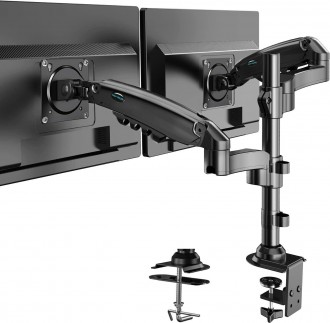
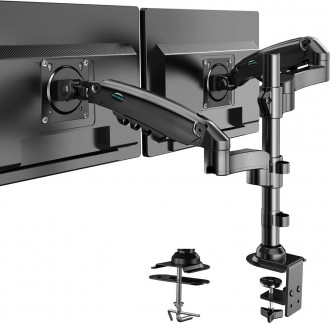
- HUANUO Dual Monitor Stand is a fully adjustable desk mount designed for 13–32 inch computer screens.
- Supports VESA 75x75mm and 100x100mm mounting patterns with each arm holding 4.4 to 19.8 lbs.
- Provides full motion adjustment with tilt, swivel, rotation, and height adjustment features.
- Includes C-clamp and grommet base options for easy and secure desk installation.
-
Cooling Mini Fan Xtech XTA-900 6-Speed RechargeableSKU: XTA-900US$ 9,00
- Xtech XTA-900 rechargeable portable mini cooling fan.
- Six adjustable fan speed levels for customized airflow.
- Built-in rechargeable battery for cordless operation.
- Compact and lightweight design for home, office, travel, and outdoor use.
- Quiet operation for comfortable use while working, studying, or sleeping.
- USB rechargeable for convenient charging from multiple power sources.
- Easy-to-use controls with ergonomic handheld design.
- Ideal for desks, commuting, camping, and personal cooling.
-
US$ 70,00
- Z-MGKISS 55L extra-large travel backpack designed for laptops up to 18.4 inches.
- TSA-friendly lay-flat design for faster airport security screening.
- Water-resistant polyester construction for everyday travel protection.
- Built-in USB charging port for convenient on-the-go device charging.
- Massive 55L capacity with multiple compartments and organizer pockets.
- Ergonomic padded shoulder straps with breathable back panel for all-day comfort.
- Heavy-duty zippers and reinforced carrying handle for long-lasting durability.
- Ideal for business trips, college, work, travel, camping, and everyday commuting.
-
US$ 36,00
- Tactical insulated lunch box designed for men and women with rugged camouflage design.
- Thermal insulated interior keeps food hot or cold for hours.
- Leakproof lining prevents spills and mess during travel.
- Expandable large-capacity design for multiple meals and containers.
- Durable heavy-duty polyester construction for outdoor use.
- Adjustable and detachable shoulder strap for easy carrying.
- Dual handles with reinforced stitching for strong load support.
- Ideal for office, travel, camping, hiking, and outdoor activities.
-
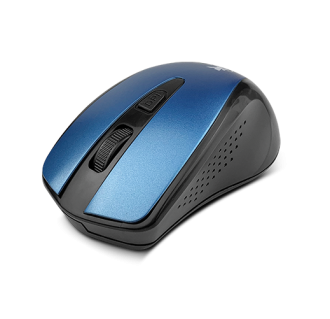
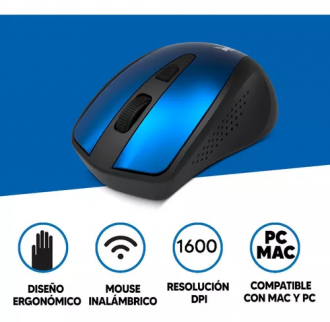
XTech "Malta" 4-Button Wireless Optical MouseSKU: XTM-315BLUS$ 7,00
Highlights
- Easy to install plug and play nano dongle that can be stowed away inside the mouse
- Contoured shape
- Available in two colors
-
X-Tech "Durham" Laptop Backpack XTB-220SKU: XTB-220US$ 18,00
DURHAM | Laptop backpack
XTB-220
Meer Informatie- Color: Blue
- Laptop Size: 15,6
- Material: 100% Polyester
- Fits laptops of up to 15.6 inches
- Spacious main compartment with a strap for fastening your laptop and room for other items
- Multifunctional zippered pocket on the front to provide easy access to IDs, bills, and keys
- Two side mesh pockets to hold a bottle or an umbrella
- Luggage strap to slide it into the bag’s handle for practical transport
- Adjustable shoulder straps for back support
- Padded, top handle to carry it as a bag
- Manufactured with high quality polyester
- Modern and lightweight design
-
Klip Xtreme "Inspire" KCK-265E Wireless Keyboard ComboSKU: Klip Xtreme "Inspire" KCK-265E Wireless Keyboard ComboUS$ 27,00
Smartly complement your digital way of life
This sleek ultra slim keyboard and mouse duo perfectly combines wireless freedom with the latest wireless technology. Ultimate connectivity is achieved through its ultra-compact 2.4 GHz dongle that virtually has no lag or interference. The multimedia keyboard features highly responsive controls, along with 12 special function keys, for one-touch access to movies, music, slides presentations, games, or the world wide web. The companion mouse, armed with a high definition sensor, delivers fawless tracking on virtually any surface. The ambidextrous design of the mouse allows you to use it in either hand, while its smart power saving function greatly extends battery life. Superb features, style and performance come together in this fully functional desktop duo.
Design
Low profile designConnection
2.4GHz ultracompact wireless dongleWaterproof
Water resistant designBattery
Battery led indicatorKeyboard
Quick access keysResolution
Meer Informatie
Resolution 1000pdi -
XTech USB Multimedia Keyboard XTK-130ESKU: XTech USB Multimedia Keyboard XTK-130EUS$ 10,00
- Stylish and contoured design that enhances your workplace
- Ergonomic key configuration reduces muscle fatigue and enhances productivity
- Simple USB wired connection
- Rear adjustable tilt legs for setting the proper keyboard angle
-
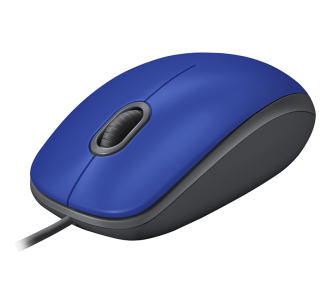
Logitech M110 Silent Wired Mouse Black / SilverSKU: Logitech M110 Silent Wired MouseUS$ 10,00
ENJOY THE SOUND OF SILENCE
OVER 90% NOISE REDUCTION
With the same click feel and over 90% noise reduction on the click sound, enjoy a quiet experience for you and your. Plus, it has feet made of high-performance material and a rubber wheel for quiet gliding and scrolling.
SIMPLE TO SET UP AND USE
Your mouse works right out of the box. No installation hassles. No software required. Setup is fast and easy—just plug the cable into a USB port and you’re good to go.
FULL-SIZE COMFORT, AMBIDEXTROUS DESIGN
Left-handed or right, you’ll be comfortable hour after hour with this full-size, ambidextrous design. The curved surface was designed to support your fingers just right in order to prevent fatigue.
QUIET MARK CERTIFICATION
Logitech is the first and unique company in the world to receive the Quiet Mark certification for a mouse. This international mark of approval from the UK Noise Abatement Society recognizes technology designed to reduce noise.
BUILT BY LOGITECH
This mouse comes with the high quality and reliability that have made Logitech the global leader for mice.
BETTER THAN A TRACKPAD
You’re in control with smooth, responsive optical tracking that moves the cursor just where you want it. Edit documents and navigate the Web more efficiently than with a trackpad.
Meer Informatie -
Logitech MK850 Performance Wireless Keyboard and Optical Mouse ComboSKU: Logitech MK850 Performance Wireless KeyboardMouseComboUS$ 120,00
Reach peak performance with this Logitech keyboard and mouse combo set. The mouse includes all the buttons you need to control your computer, while the full-size keyboard lets you access an array of functions and controls. Hotkeys, an ergonomic wrist rest and wireless connectivity ensure this Logitech keyboard and mouse combo set is great for work and play.
Features
Concave keys and cushioned palm rest
For comfortable all-day typing.Hyper-fast scrolling and full-sized keyboard
Fly through documents and web pages and type quietly and efficiently.Logitech DuoLink software
Links the mouse and keyboard together for custom functionality and smarter navigation.Dual connectivity
Connects to any USB-equipped or Bluetooth® Smart ready device that supports an external keyboard (HID profile).Logitech FLOW cross-computer typing
Use as a regular keyboard or combine with a compatible Logitech FLOW mouse (sold separately) to type, copy, paste and move files seamlessly between computers.33' wireless range
Lets you sit in any convenient place in the room.Multi-device and multi-OS friendly
Meer Informatie
Start typing on your computer, then switch and type on your tablet, phone or another computer. Pair your mouse with up to three devices for seamless multitasking.